Dual-Xeon Optane Server
A 48-core dual-socket Debian machine running 512 GB of Intel Optane persistent memory as tiered system RAM
Project Overview
Every systems course draws the same memory pyramid, with a roughly 123x cliff between DRAM and the fastest SSD that nothing on a normal machine fills. Intel's Optane was built to fill it, and I already had the parts: four 128 GB Optane persistent memory modules, an Optane P4800X SSD, Intel P4610 NVMe drives, and two pre-production Xeon Gold 6252s. So I designed a machine around the gap instead of just reading about it.
Getting there took two motherboards. The first one had two dead memory channels on its second socket, which turned out to block Optane entirely; a CPU swap between sockets proved the fault was the board's. On the replacement, a Supermicro X11DAi-N, every slot trains. The machine is now a 48-core / 96-thread Debian box where the Optane runs as a second tier of system RAM (total memory in free went from 62 to 558 GB), and it passed a 24-hour burn-in with zero failures and zero ECC errors. Along the way I built a phone dashboard for its management controller.
The gap
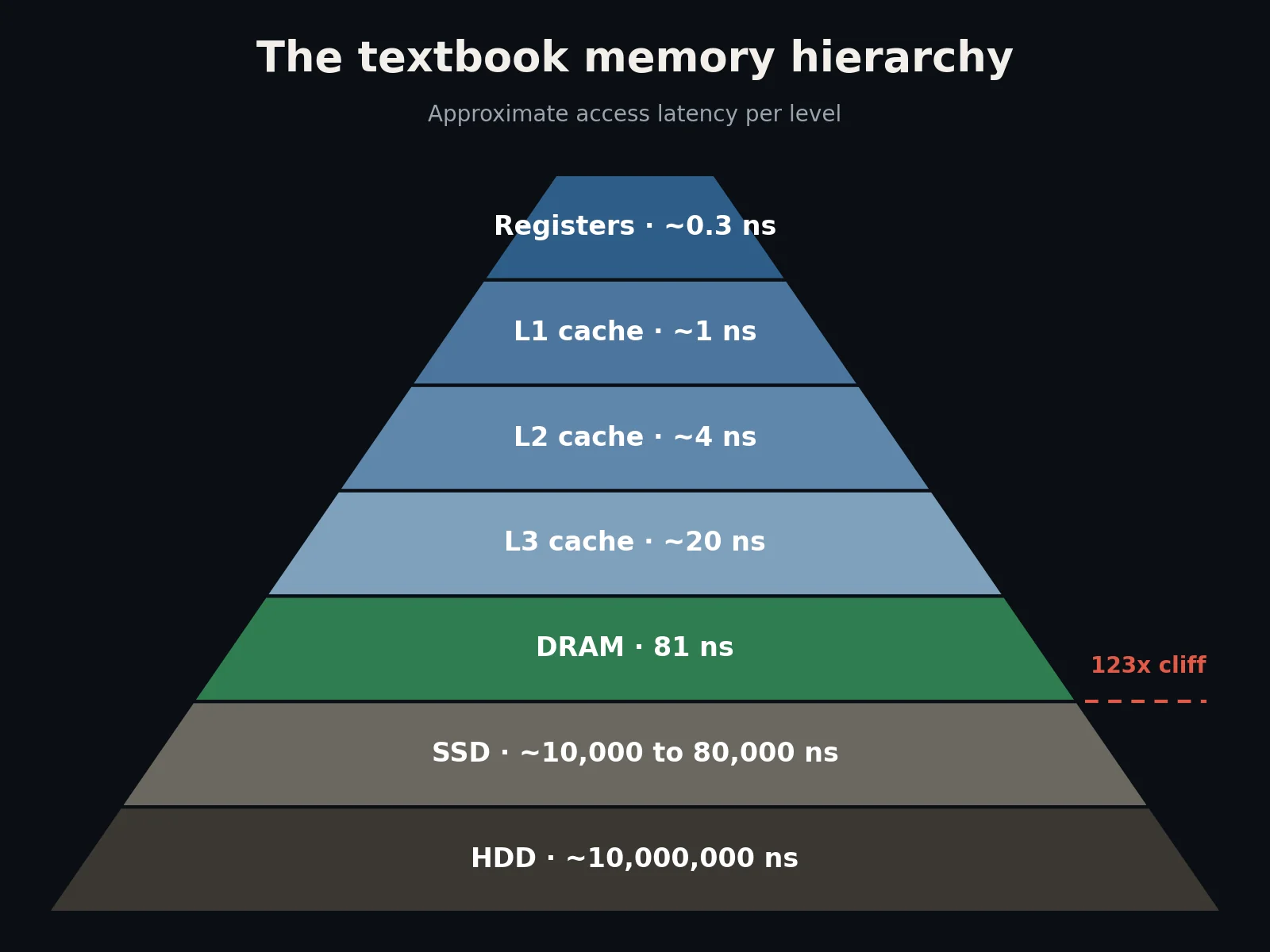
The textbook pyramid. The red line marks the roughly 123x jump from DRAM to SSD.
The parts
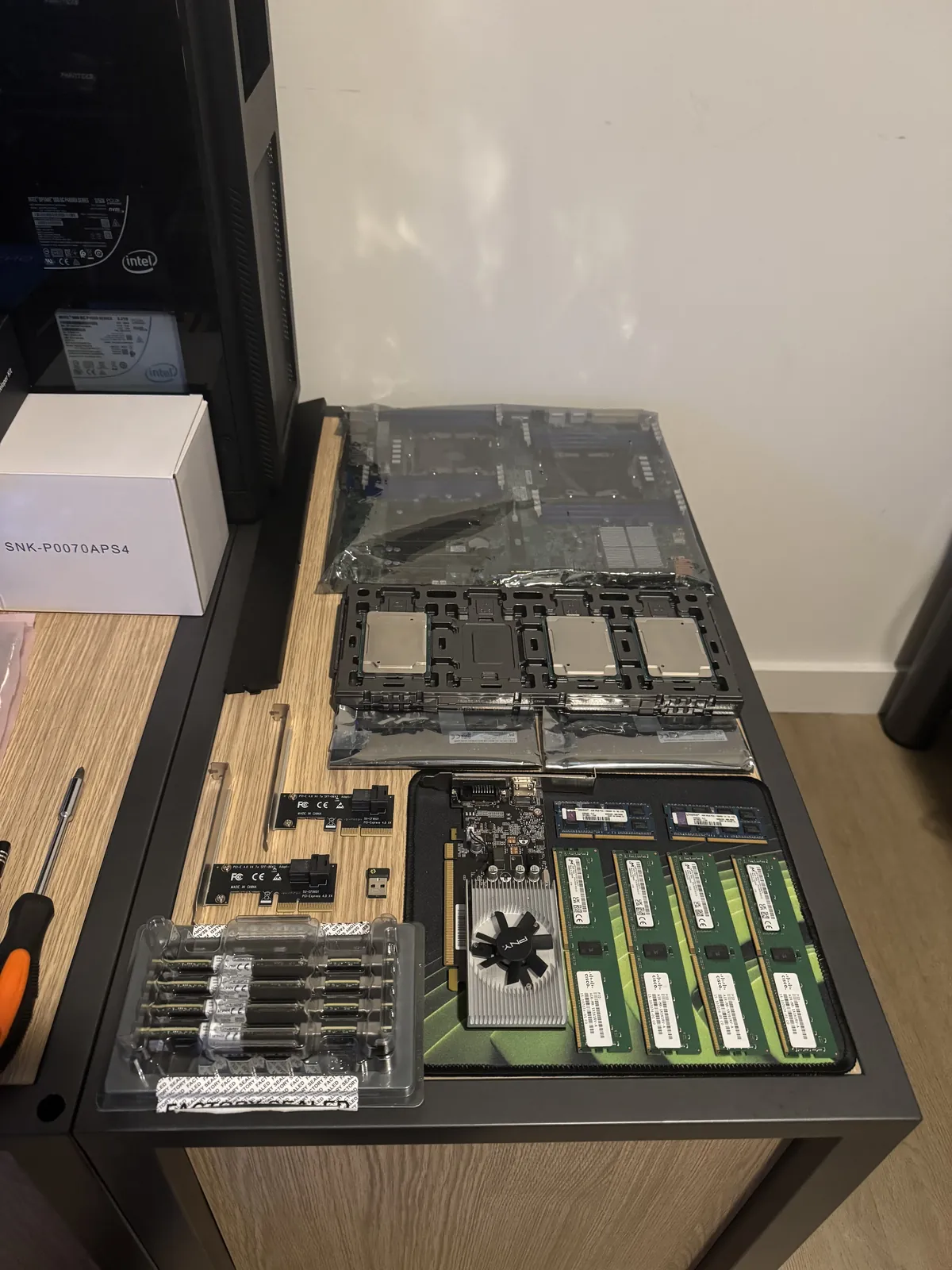
Everything before the first build: the original X11DPi-N board, the CPUs, four factory-sealed Optane memory modules, DDR4 RDIMMs, a GT 1030, and PCIe-to-U.2 adapters for the NVMe drives.
Design
The goal was a Linux desktop that also hosts things: not a hypervisor, not a NAS, not an AI box. That ruled out Proxmox and a big GPU, and meant Debian on bare metal, with my laptop reaching it over Tailscale and SSH but never depending on it.
Going dual-socket put both CPUs to work and made the Optane layout legal: Supermicro allows 2, 3 or 6 modules per socket, so four only fit split 2 + 2 across two sockets. It also set the rest of the parts list: a case that really fits a 12" x 13" SSI-EEB board (a Phanteks Enthoo Pro TG), an 850 W power supply with the two 8-pin EPS connectors the board wants, and active coolers, since passive server heatsinks assume a wall of high-RPM fans and would cook in a tower. The memory is four 16 GB single-rank x4 RDIMMs, a module type on the Optane compatibility list.
I planned to run the Optane in App Direct mode rather than Memory Mode. Memory Mode turns all 64 GB of DRAM into a hidden cache in front of 512 GB of Optane; App Direct keeps the DRAM visible and fast and adds the Optane next to it, so the kernel can decide what lives where.
First build
Pre-production CPUs aren't guaranteed to boot, so I started with only enough to power on (board, power supply, one cooler, one stick of RAM) and tested that first, with a retail Xeon as a backup boot chip. The 6252s booted fine on the board's existing BIOS 3.5, so nothing needed flashing.
LGA3647 works differently from a consumer socket: the CPU clips into a carrier on the heatsink, and the whole module lowers in as one piece, torqued down with a T30 driver in a set order, since uneven pressure can cause memory faults. Bring-up took a few fixes. The BMC (the board's built-in management controller) still had a previous owner's static IP on another network, so it never showed up until I found and changed it in the BIOS. The Optane SSD booted into Intel's discontinued Memory Drive Technology hypervisor until I took it out of the boot order. Debian needed GRUB reinstalled to the UEFI fallback path before it would boot on its own. And my first "RAM" turned out to be NVDIMM-N modules (NN4 in the part number instead of PC4), battery-backed persistent DIMMs that Linux kept trying to set up as persistent memory, and that Supermicro doesn't allow next to Optane anyway.
The first build
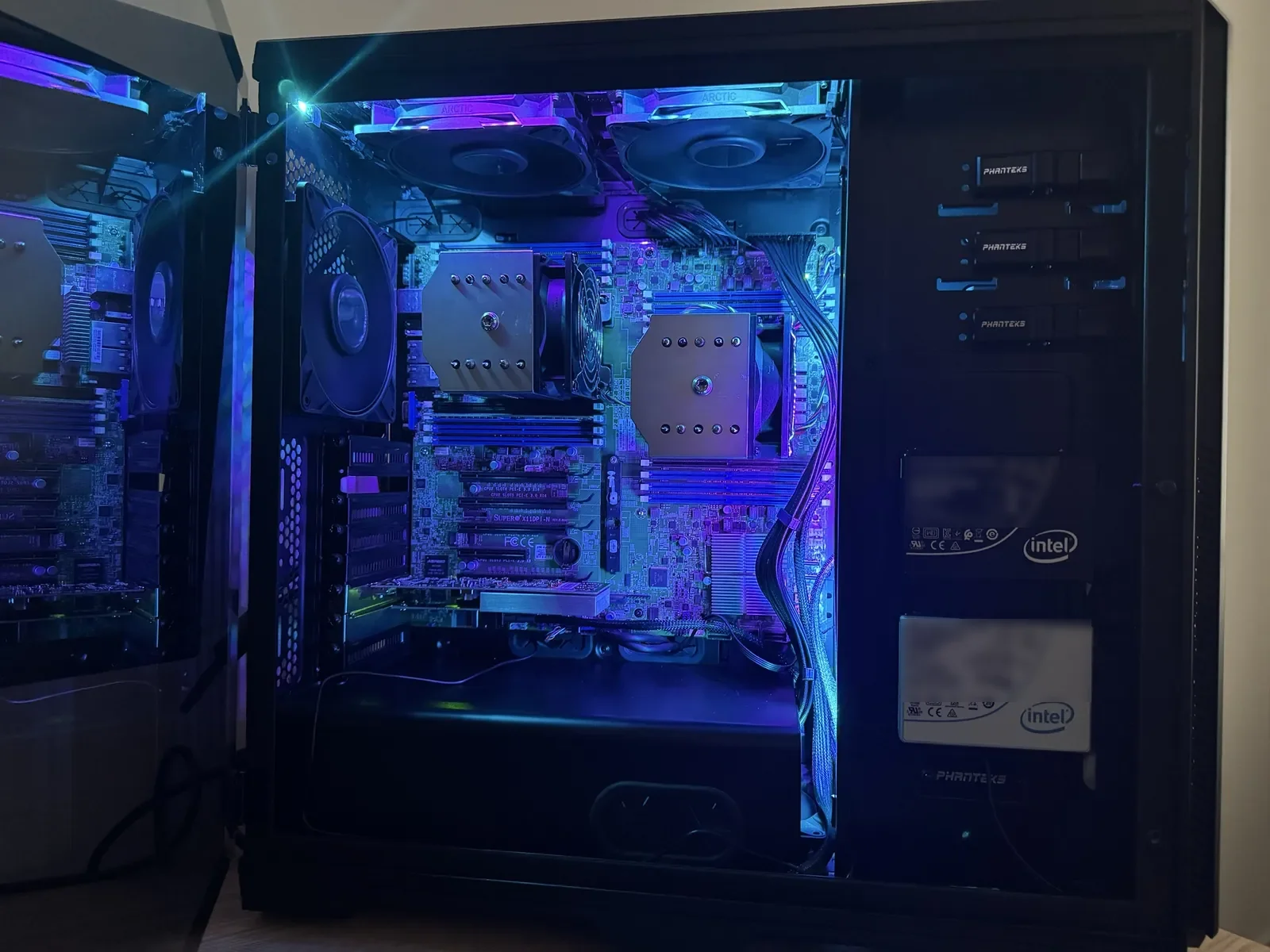
The first build on the X11DPi-N, assembled and running.
The dead channels
With proper RDIMMs in, the machine booted with 48 GB instead of 64, and the BIOS listed one slot on CPU 2 as "Mapped Out." I narrowed it down one boot at a time:
Swapping modules: the same slot failed, so not a bad stick.
Clearing CMOS: still failed, so not stale settings.
Second slot on the same channel: failed, so not one damaged slot.
Next channel on the same memory controller: failed, so not a single-channel fault.
Channel C on that controller: worked, so the controller itself was alive.
Each Cascade Lake CPU has two memory controllers with three channels each (A/B/C and D/E/F). Channels A and B on CPU 2 never trained, while channel C worked, so I ran all four sticks from slots that did and got the full 64 GB back. That looked like a minor annoyance until the Optane went in.
What the BIOS said

The POST screen from that first Optane attempt, with one Optane module per socket in slot D2.
No DDRT on MC0
My first Optane attempt put one module per socket in slot D2, away from the dead channels. DDR-T is the protocol Optane speaks over the DDR4 bus and MC0 is memory controller 0: the firmware wants both a DRAM module and an Optane module on every memory controller, and I had put both Optane modules on MC1.
The error was good news and bad news. Good: a CPU without Optane support wouldn't produce a DDR-T-specific error, so the pre-production chips did support it. Bad: CPU 2's memory controller 0 had exactly one working slot, and it had to hold the DRAM. One slot can't be both, so dual-socket Optane was impossible on this board.
That left two suspects: CPU 2, or socket 2. I pulled both CPU modules and swapped them between sockets. If the dead channels followed the CPU, the chip was bad; if they stayed put, the board was. They stayed in socket 2, both 6252s were fine, and the board was replaced.
Original board: X11DPi-N memory map
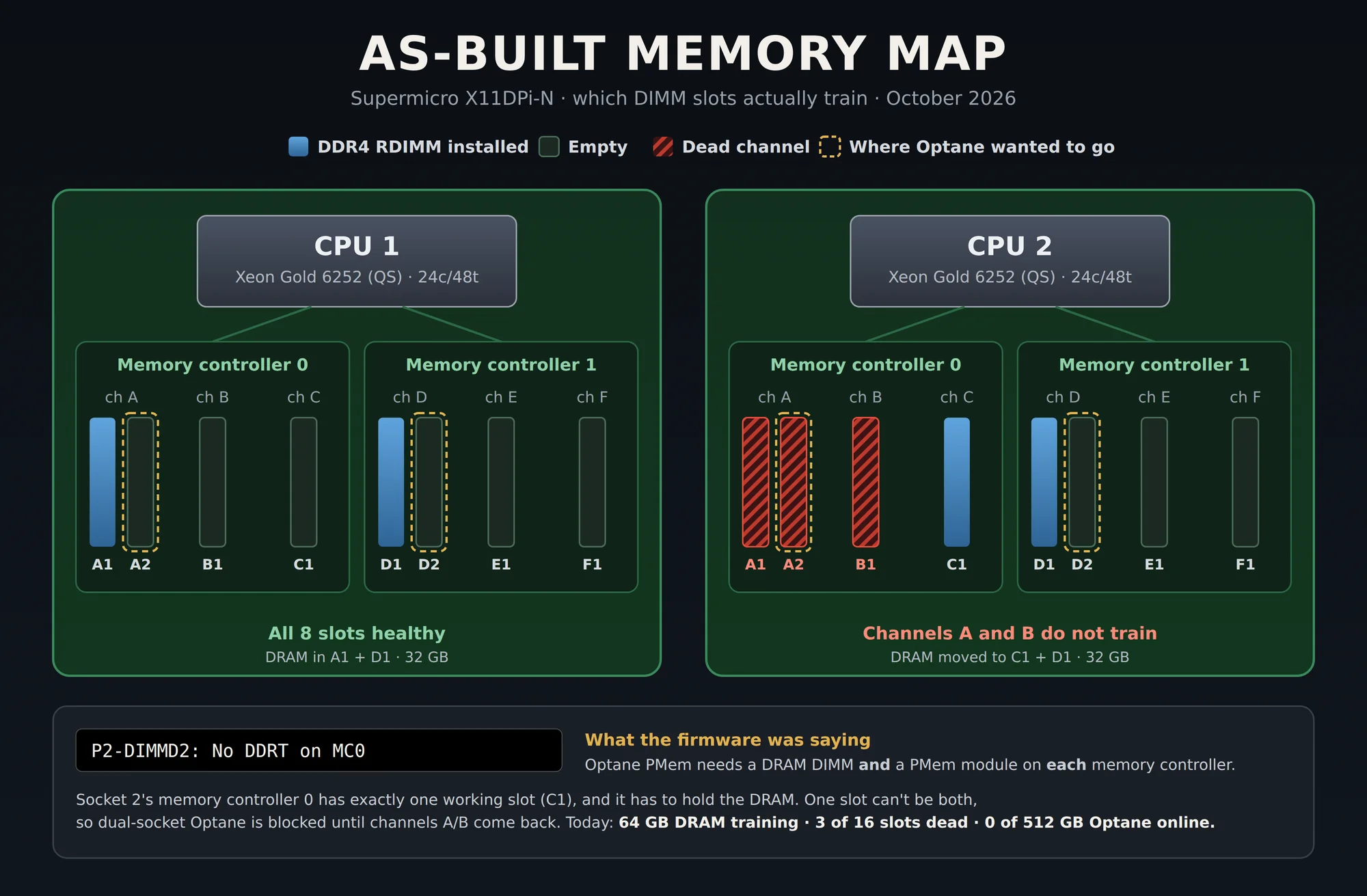
The original X11DPi-N in early October. CPU 1 is fully healthy; on CPU 2, channels A and B don't train, and the dashed slots are where Optane needed to go.
A second board
The replacement had to be dual LGA3647 with Cascade Lake support, official Optane support, a normal tower form factor, the same narrow heatsink mount, and a BIOS that accepts pre-production CPUs. That ruled out more boards than I expected and left mostly Supermicro. I went with the X11DAi-N, which is nearly the same board as the X11DPi-N (same sockets, 16 DIMM slots and BMC). It came with two retail Xeon Gold 5122s and Supermicro heatsinks with Noctua 92 mm fans in push-pull, which are much quieter at a desk, so I switched to those coolers.
It booted first try on the 5122s, on BIOS 4.7, with all 64 GB at 2666 MT/s (the 5122's limit). Then I ran the test I wished I'd done on day one with the old board: rotate the DIMMs through every slot, one boot at a time, and photograph the BIOS memory screen after each. All twelve first slots (A1 through F1 on both sockets) trained. The 5122s are Skylake chips, which can't run Optane at all, so the second slots in channels A and D got their test when the Optane went in on the 6252s.
The second build
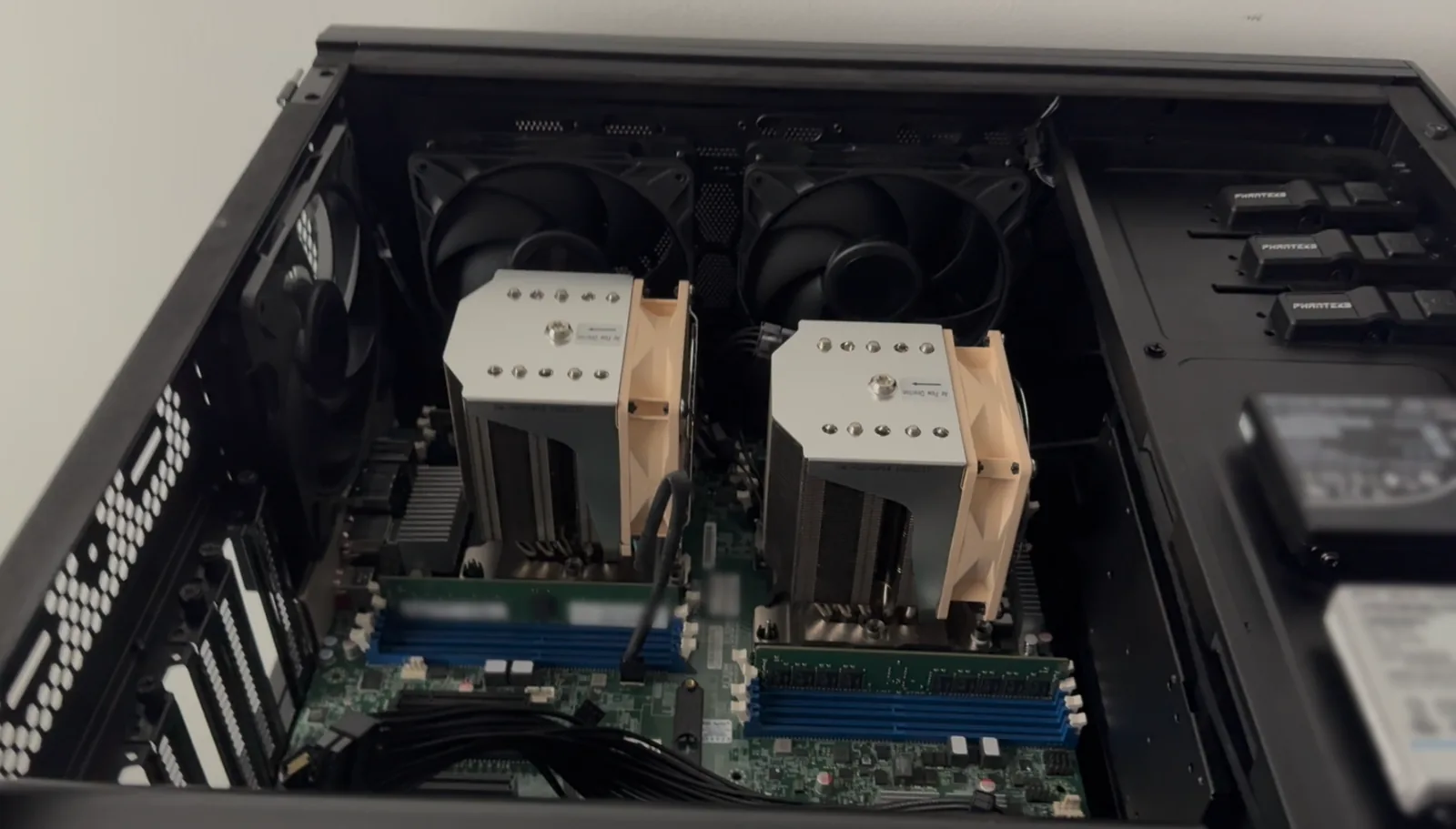
The X11DAi-N in the same Phanteks case, with Supermicro heatsinks and Noctua fans.
Optane, finally
With the 6252s back in, the layout was one DRAM stick and one Optane module per memory controller: DRAM in A1 and D1, Optane in A2 and D2, on both sockets. That is exactly the rule the old board couldn't meet.
The BIOS showed 516,096 MB, which is four times 126 GiB (the usable size of each 128 GB module), and the DRAM had vanished. The modules had arrived provisioned in Memory Mode from their previous life. The BIOS also warned that the layout is "not POR" (Intel's Plan of Record, its list of validated configurations): two DRAM plus two Optane per CPU isn't on Supermicro's tables. That's a warning, not an error, and the real tests passed: it boots, all four modules report Healthy, and the BMC's event log shows no memory errors. Switching to App Direct was a BIOS goal (0% Memory Mode, the rest App Direct), and after a reboot it showed 65,536 MB of DRAM and 583,168 MB total.
In Debian, the Optane becomes regular memory in three steps: a devdax namespace on each socket's Optane region (248 GiB each), handing those devices to the kernel as system RAM, and turning on memory tiering so hot pages stay in DRAM and cold pages get demoted to Optane. The Optane shows up as two extra NUMA nodes with memory and no CPUs, in a slower memory tier than the DRAM, and a small systemd unit redoes the onlining at every boot. One documented cost: with first-gen Optane installed, all memory runs at 2666 MT/s instead of 2933.
Current board: X11DAi-N memory map
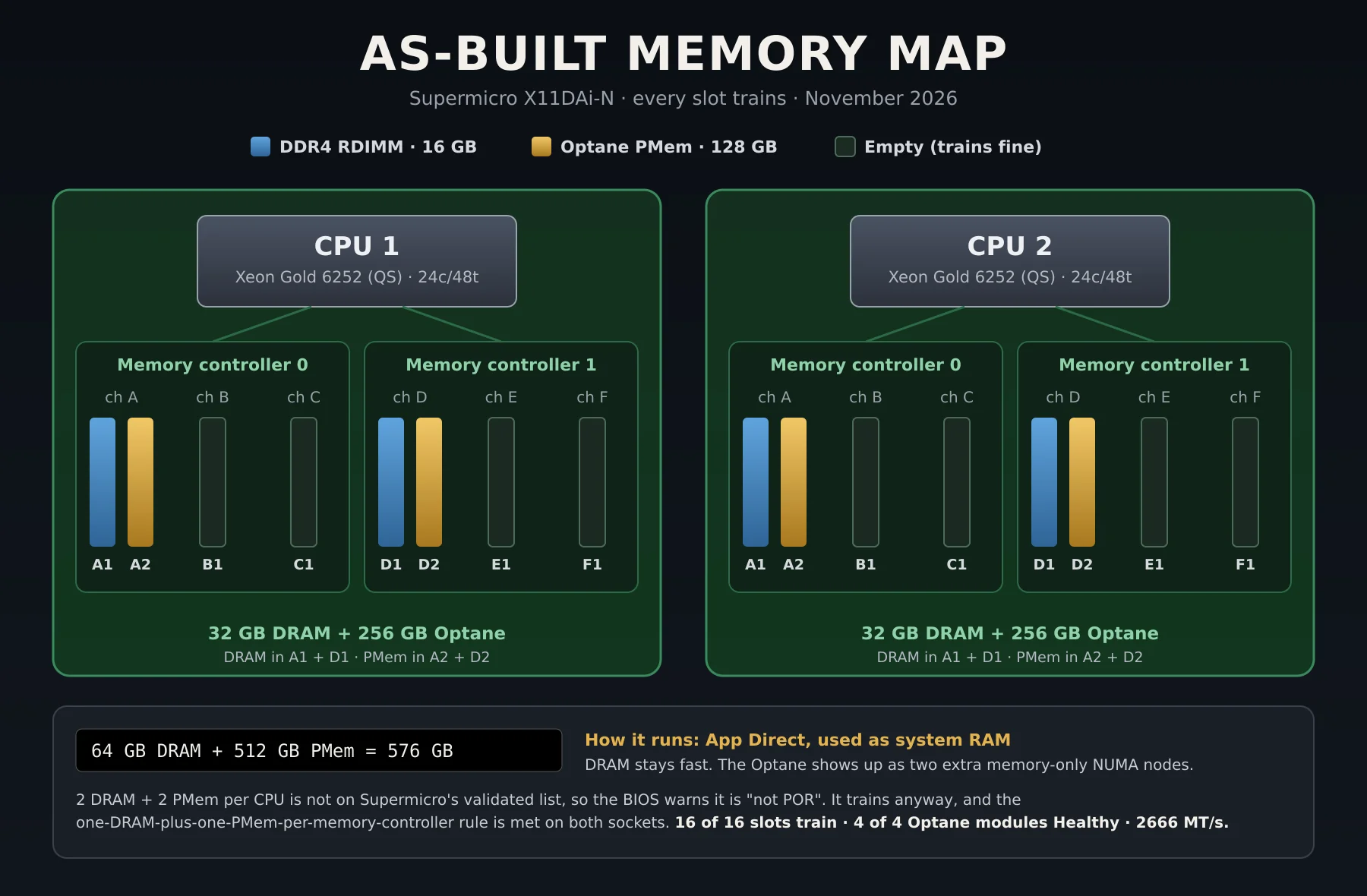
The X11DAi-N today. One DRAM stick and one Optane module on each memory controller, on both sockets, with every slot training.
What the BIOS reports
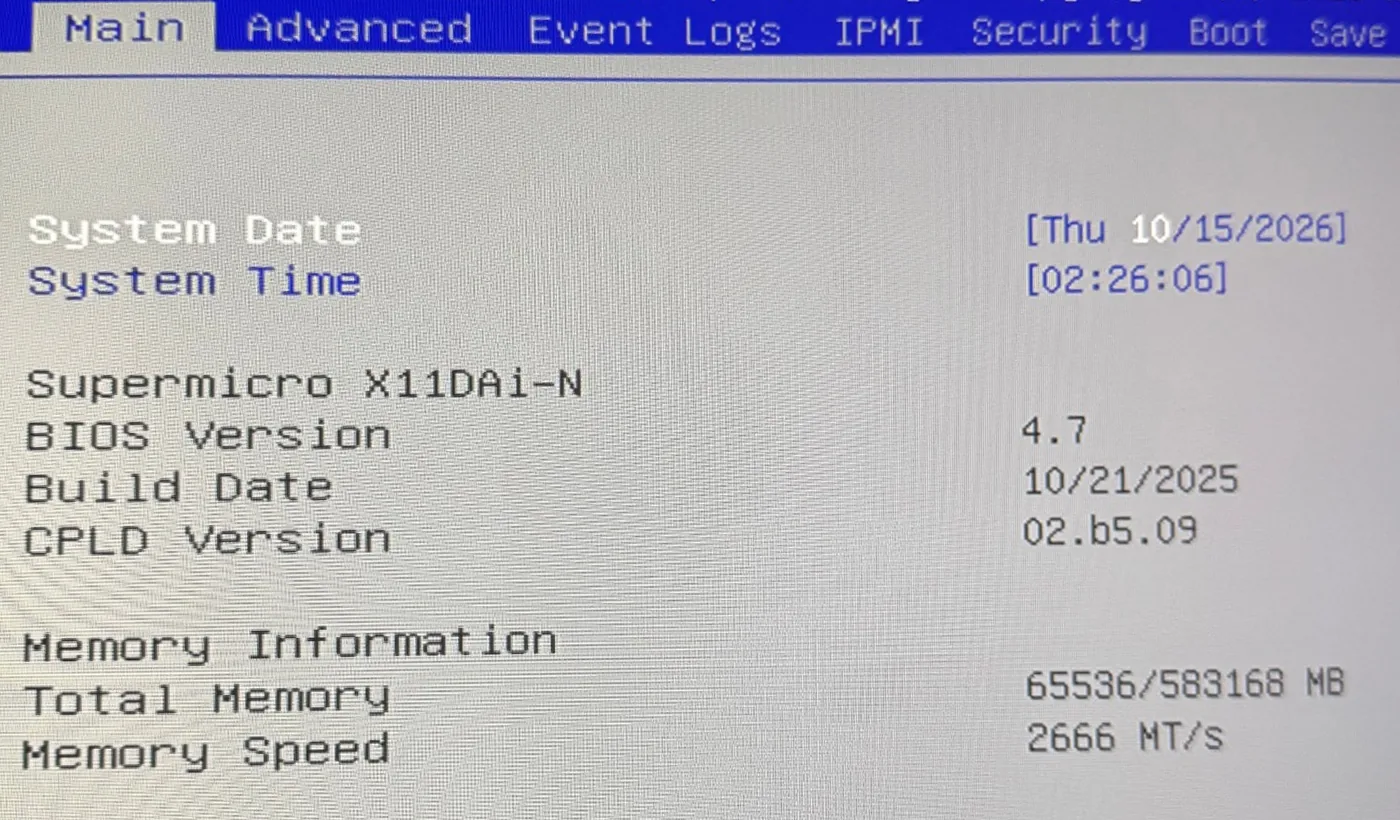
After the switch to App Direct: 65,536 MB of DRAM out of 583,168 MB total, on BIOS 4.7 at 2666 MT/s.
Optane as system RAM
# one devdax namespace per socket's App Direct region
ndctl create-namespace --mode=devdax --region=region0
ndctl create-namespace --mode=devdax --region=region1

# hand both to the kernel as RAM (new NUMA nodes 2 and 3, no CPUs)
daxctl reconfigure-device --mode=system-ram all

# tiering: keep hot pages in DRAM, demote cold pages to Optane
echo true > /sys/kernel/mm/numa/demotion_enabled
sysctl kernel.numa_balancing=2

# free -g, total memory: 62 before, 558 after
Two DRAM nodes, two Optane nodes
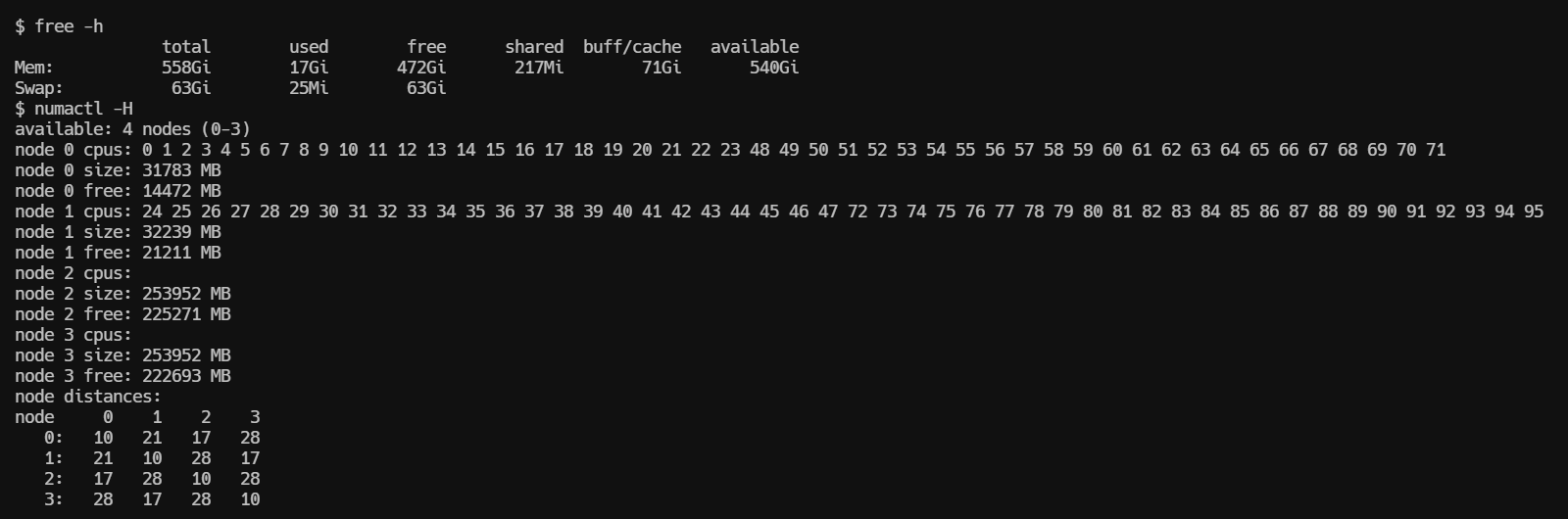
free -h reports 558 Gi in total. numactl shows the DRAM as nodes 0 and 1 (about 32 GB each, with all the CPUs) and the Optane as nodes 2 and 3 (253,952 MB each, no CPUs), each Optane node closer to its own socket (distance 17) than to the other (28).
Fans that kept yelling
The Noctua heatsink fans idle around 300 RPM, but the BMC's default thresholds assume datacenter fans: lower non-recoverable 200, lower critical 300, lower non-critical 500. The fans sat right on the critical line, so the BMC kept deciding they had failed and ramping everything to about 1,700 RPM, then backing off, over and over. One fan also stalled to 0 at minimum duty.
I lowered the thresholds on both heatsink fan headers to 0 / 100 / 200 over IPMI and switched the fan mode to Standard, which keeps a duty-cycle floor so the fans never stall. Both now read "ok," and the settings survived a BMC cold reset. At idle, the DRAM sits around 38 to 41 °C and the Optane around 50 °C.
The loop in the event log
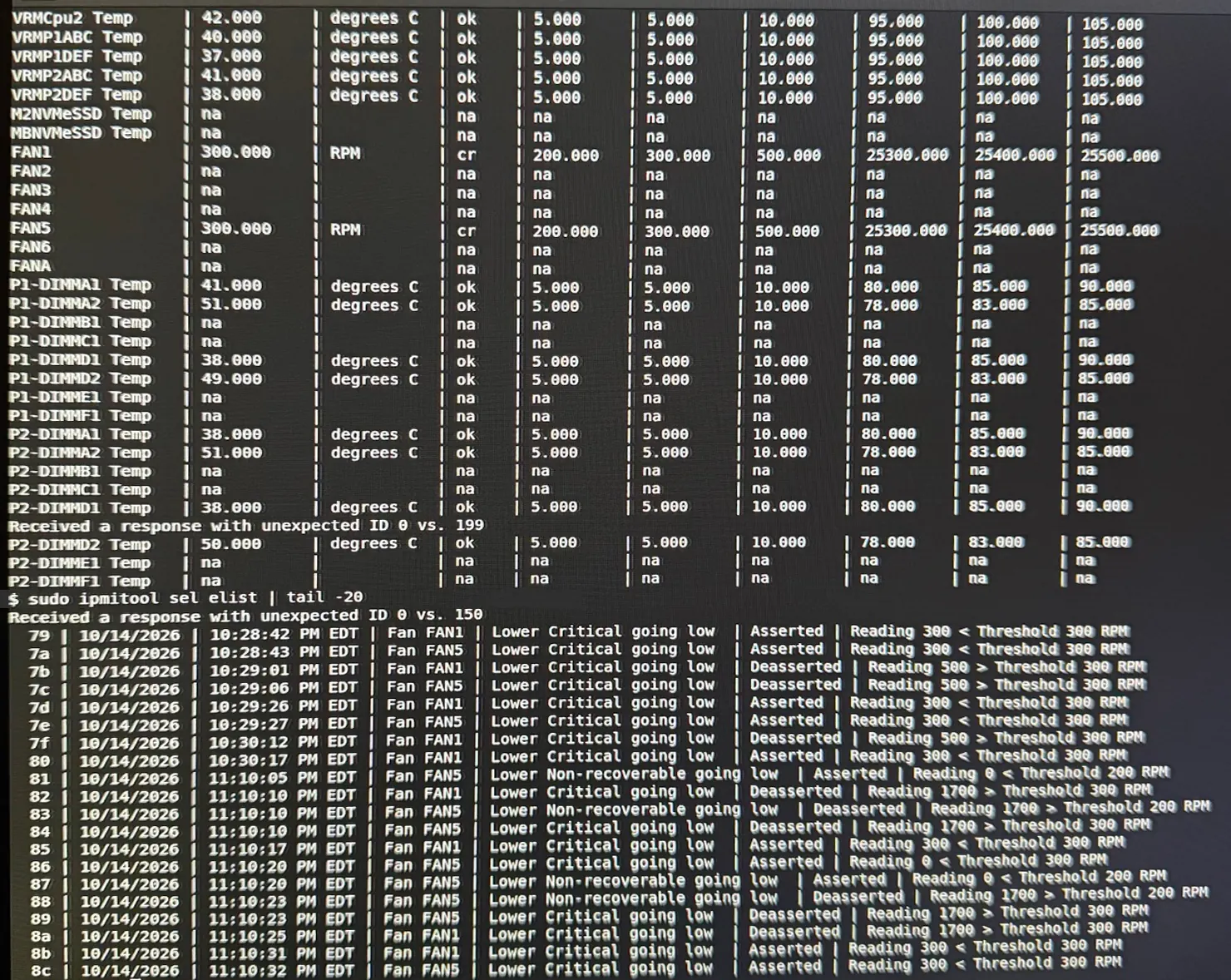
Before the fix: FAN1 and FAN5 (the heatsink fans) read 300 RPM against a lower critical threshold of 300, and the event log flips between Asserted and Deasserted as they ramp to 1,700 and fall back, with FAN5 hitting 0.
Debian, and handing setup to Claude Code
I reinstalled Debian 13 on the new board. The graphical installer and the boot splash both crash on the onboard VGA, so it was the text installer with nomodeset. GNOME then gave a black screen over the BMC's remote console until I turned off Wayland in GDM and blacklisted nouveau so the onboard VGA is the only display.
For the rest of the setup I installed Claude Code on the server itself and gave it a CLAUDE.md with the machine's context, a task list, and rules it can't break: never touch the boot drive, show a disk's model and serial and get my explicit yes before anything destructive (device names can change between boots), don't reboot without asking, no BIOS changes from software, and never expose the BMC. It keeps a change log with how to undo each step. In practice I ran the commands that needed root and it checked the results, which is how the Optane onlining, the drive tests and the burn-in below were done.
Burn-in
I wanted the new board stressed hard early, with every test checking its own results:
8 hours of CPU and DDR4 (stress-ng, 112 workers, 48 GB, --verify): passed, 0 failures.
The P4800X Optane SSD: erased, then fully written and read back with checksums (375 GB each way at 2.34 GB/s write, 2.70 GB/s read).
The P4610: a full 2,981 GiB read, since its firmware doesn't support NVMe self-tests, with a clean SMART compare before and after.
4 hours of Optane only (440 GB of verified memory workers on the Optane NUMA nodes): passed, 0 failures.
24 hours of everything at once: 80 CPU workers, 24 GB on the DRAM and 400 GB on the Optane with --verify, plus checksummed fio on both drives (13.6 TB through the P4800X, 2.7 TB through the P4610). No failures, no I/O errors, and the kernel's ECC counters stayed at 0 corrected and 0 uncorrected for the whole run.
Two findings along the way. First, the P4610 had taken about 680 GB of writes during the early runs, almost all to swap, with no real memory pressure behind it. It turned out stress-ng's default random madvise hints page memory out on purpose; with --no-madvise the 24-hour run swapped nothing. Second, CPU 2 runs 10 to 14 °C hotter than CPU 1 at the same 150 W (24-hour peaks of 84 vs 70 °C, under the chip's 88 °C high mark, no throttling). Repasting it changed nothing, and the voltage regulators next to it also run hotter at idle, so it points to less airflow around that socket rather than the paste.
BMC dashboard
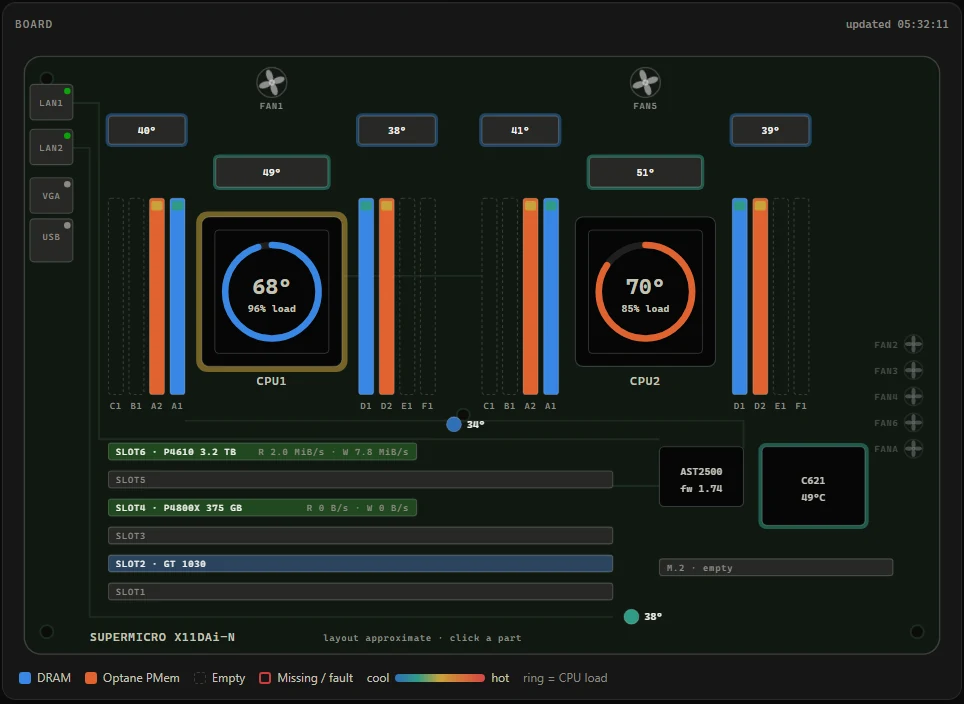
The dashboard's Board tab, shown in its built-in demo mode with simulated readings.
The dashboard
I also built a dashboard for the BMC: a standard-library Python server (plus the cryptography package for push), plain JavaScript, and no build step. It started on Redfish, but almost every Redfish endpoint on this board needs a paid Supermicro license, so it reads the BMC over IPMI with ipmitool instead. A small read-only agent on the server adds what the BMC can't see: per-socket CPU load, the DRAM and Optane NUMA nodes, disks, network and processes.
The Board tab draws the machine as it really is, with temperature rings on each CPU, every DIMM slot colored by DRAM or Optane, fans and PCIe cards. Other tabs give a task-manager view with 24-hour history, the BMC event log, and a real terminal on the server. It installs on a phone's home screen as an app, and power controls stay off unless enabled, each behind a confirmation. It's only reachable inside my Tailscale network, and anything that can change the machine also checks the Tailscale login, the page's Origin and (for the terminal) which process is on the other end of the socket, with the read-only services sandboxed under systemd. A System tab (services, updates, logs) sits behind a separate unlock, and phone alerts go out over Web Push, where I implemented the RFC 8291 message encryption and VAPID signing myself on top of cryptographic primitives instead of pulling in a push library. It has 257 unit tests. The dashboard is temporarily offline while it moves to a new host.
Where it stands
Running: two Xeon Gold 6252s (48 cores / 96 threads) on the X11DAi-N, 64 GB of DDR4 plus 512 GB of Optane as tiered system RAM, Debian 13 on the P4610, the P4800X as a fast scratch drive, and an Optane M10 in the M.2 slot (wiped and verified, saved for later). The burn-in is done and the fans are quiet.
Next: a real GPU in place of the GT 1030, moving both U.2 drives from adapter cards to the board's own OCuLink ports, backups before real work lands on it, and measuring DRAM and Optane latency on my own hardware instead of quoting published numbers. Later: hard drives in a ZFS pool with the M10 as its write log, and more DRAM. Four sticks fill only 2 of 6 channels per socket, so memory bandwidth is about a third of what the board can do.
Skills & Technologies
Project Info
July 2026 - Present
Running